
When we think about optimizing Android applications, we usually focus on reducing APK size, improving startup time, minimizing overdraw, or fixing memory leaks. One aspect that often goes unnoticed is dependency lifetime.
Dependency Injection frameworks like Hilt make object creation effortless, but they also make it surprisingly easy to keep objects alive much longer than necessary.
This article isn’t about using Hilt—it’s about using Hilt intentionally.
It’s about understanding that every scope you choose is also a decision about memory ownership.
How We Did It Earlier
Like many mature Android applications, our codebase at OLX evolved over several years. Features were added, teams expanded, modules grew, and Hilt became the backbone of our dependency graph.
As the project matured, a pattern naturally emerged.
Whenever a new repository, helper, manager, or use case was introduced, the default answer to scoping was almost always the same:
“Just make it @Singleton.”
Repositories?
@Singleton
class SearchRepository @Inject constructor(…)
Use cases?
@Singleton
Managers, analytics trackers, helpers?
Also @Singleton.
At first glance, this seemed perfectly reasonable.
✅ The app worked.
✅ Features shipped quickly.
✅ There were no crashes caused by dependency injection.
✅ No obvious memory leaks.
✅ No immediate reason to question the approach.
And because everything was working, the conversation around scoping simply stopped.
The Hidden Cost of “Working”
Although the application behaved correctly, something subtle was happening underneath.
Every object marked as @Singleton became part of the application’s object graph for the entire lifetime of the process.
Even if a repository was only ever used on a single screen, Hilt would keep that instance alive until the application itself was terminated.
Let’s try to understand this with a real life example – The Application Search Flow
The user opens search, a search repository object is created. Even if the user leaves search forever, the repository object remains alive.
Not because anything is using it. Not because of a memory leak.
Simply because its scope says it should.
This is an important distinction.
The memory wasn’t leaking. It was never designed to be released.
As more features were added, these unnecessary long-lived objects accumulated. Each one might consume only a small amount of memory, but together they formed a dependency graph much larger than necessary.
Over time this resulted in:
⚠️ Higher baseline memory usage
⚠️ Objects retaining stale state across user journeys
⚠️ Larger heap sizes during navigation
⚠️ Increased GC pressure
⚠️ More difficult reasoning about object ownership
None of these problems appeared overnight. They accumulated gradually as the application evolved.
The Turning Point
The realisation didn’t come because of crashes nor because LeakCanary started reporting leaks. Instead, it came from looking at memory over longer user sessions. Heap usage continued to grow as users navigated through different parts of the app. Some memory was reclaimed. Much of it wasn’t.
Heap dumps showed repositories, managers, and helper classes that no longer served any active screen but were still retained because they belonged to the application-level dependency graph.
That led us to ask a very different question.
Instead of asking: “Can this be a Singleton?”
We started asking: “Who actually owns this object?”
And more importantly, “How long does this object really need to exist?”
That subtle shift completely changed how we approached dependency injection. We stopped viewing Hilt as just a framework for creating objects. We started viewing it as a framework for managing object lifecycles and memory.
Understanding What @Singleton Really Means
Developers often think of @Singleton simply as “one instance.”
While technically true, that definition misses the more important implication.
A singleton lives for as long as the application process lives.
@Singleton
class SearchRepository @Inject constructor(
private val api: SearchApi
)
Once this repository is created:
- It remains in memory until the application process is killed.
- It survives screen changes.
- It survives navigation.
- It survives ViewModel destruction.
- It survives configuration changes.
Even if no screen ever needs it again.
If the repository internally caches responses, holds collections, or references expensive objects, all of that memory stays alive as well. For objects that truly represent application-wide state—such as analytics, authentication, feature flags, or configuration—this behaviour is exactly what we want. But for screen-specific business logic, it is unnecessarily expensive.
Choosing a Scope That Matches Reality
Suppose a repository is only consumed by a single ViewModel.
Instead of making it an application singleton, we can scope it to the ViewModel itself.
@ViewModelScoped
class SearchRepository @Inject constructor(
private val api: SearchApi
)
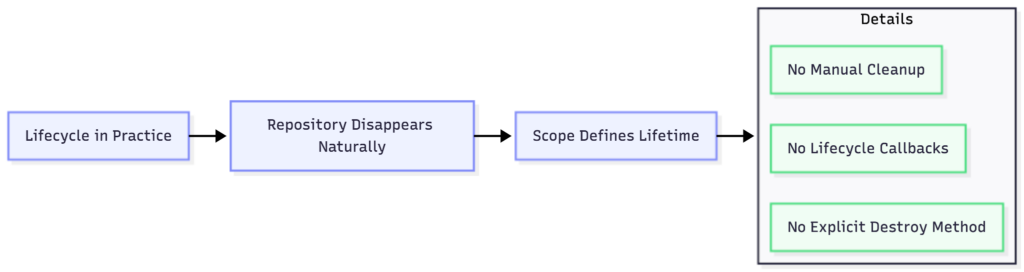
Now Hilt creates one repository instance for that ViewModel. As long as the ViewModel exists, the repository exists. When the ViewModel is cleared, the repository becomes unreachable and is eligible for garbage collection. The object’s lifetime now matches the lifetime of the feature that owns it.
No longer.
No shorter.
✅ Exactly right.
Lifecycle in Practice
Memory Comparison
The difference becomes much clearer when we compare both approaches.
| @Singleton | @ViewModelScoped |
| Lives for the entire app process | Lives only as long as the ViewModel |
| Memory retained across all screens | Memory released after leaving the screen |
| Can accidentally retain stale state | Fresh instance for every feature lifecycle |
| Larger dependency graph | Smaller object graph |
| Higher long-session memory usage | Lower baseline memory usage |
| Easy to overuse | Encourages clear ownership |
Heap Dumps Don’t Lie
One of the most convincing ways to validate scoping decisions is by comparing heap dumps before and after the migration.
With heavily singleton-scoped repositories, memory usage looked something like this:

The comparison below is taken from our production application and highlights the impact of migrating from an @Singleton-heavy dependency graph to lifecycle-aware Hilt scoping. It shows memory usage before and after the changes, demonstrating how proper scoping helps reduce retained memory over long user sessions.
Scoping Is About Ownership
The lesson became increasingly clear as we revisited our dependency graph:
- Every object should live exactly as long as the component that owns it.
- If a repository belongs to a screen, scope it to that screen.
- If it belongs to a navigation graph, use a navigation scope.
- If it truly represents an application-wide state, then—and only then—make it a singleton.
The scope should reflect ownership, not convenience.
Conclusion
@Singleton is not inherently bad. In fact, it is the correct choice for many application-wide dependencies.
The problem arises when it becomes the default answer for every class. Choosing the appropriate Hilt scope is one of the simplest architectural improvements you can make. It requires no complicated algorithms.
No custom memory optimisations.
No major refactoring.
Just a better understanding of object lifetimes.
Small changes in scope can significantly reduce retained memory, produce cleaner ownership boundaries, simplify reasoning about state, and make your application more resilient as it scales. At the end of the day, dependency injection isn’t only about creating objects. It’s about knowing when they should stop existing.
