
Search is one of the most-used features on OLX. Every day, millions of users type what they want — sometimes clearly, sometimes not. They might type “dzire car delhi”, “hondaa city”, or “iphone13 pro”.
Our job? To make sure OLX understands what a user actually mean — that too instantly.
This post is about how we built an intelligent autosuggestion engine that makes search faster, smarter, and more human — one that understands intent, not just text.
1. What is Autosuggestion?
Autosuggestion predicts and displays possible search terms as users begin typing.
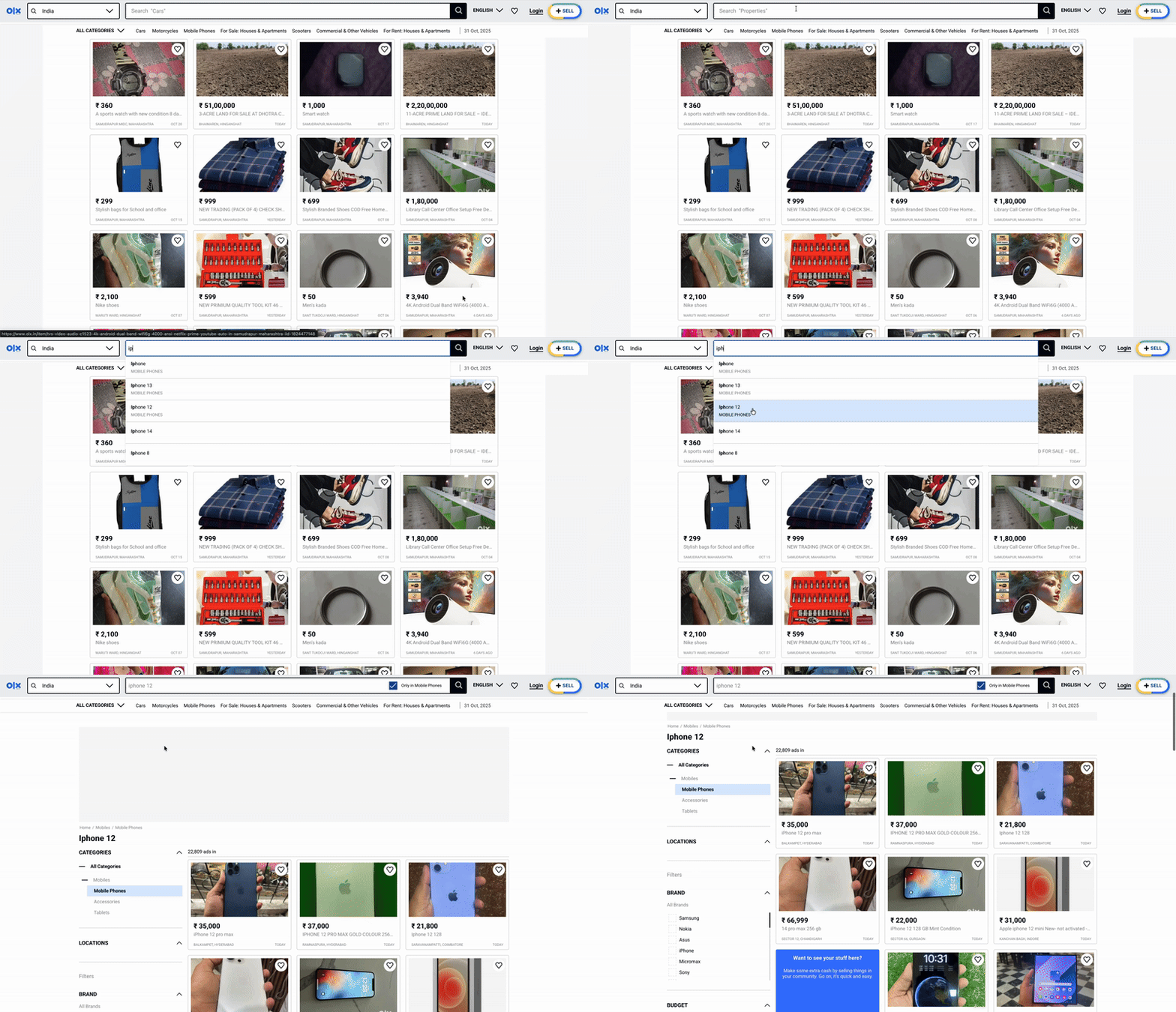
For example, when someone types “iph”, the system suggests related terms, tagged by category for a more focused search:
- iPhone
- iPhone 13
- iPhone 12
This helps users complete searches faster, improves discovery, and increases engagement.
While it seems simple, autosuggestion actually combines user behaviour data, intelligent text processing, and ranking mechanisms to make every keystroke meaningful.
2. Why Search Suggestions Are Needed
Users often search in unpredictable ways — using abbreviations, mixing Hindi and English, adding locations, or making typos. These issues can lead to zero-result pages, which harm user experience.
To solve this, we needed autosuggestions that:
- Correct spelling mistakes automatically.
- Rank suggestions based on popularity and engagement.
- Tag suggestions with the right category to ensure more accurate product matches.
3. Process: From Raw Searches to Smart Suggestions
Overview
The process begins by collecting and analysing users’ past search queries.
This data helps identify common search patterns and preferences.
From these insights, we:
- Build category-specific vocabularies.
- Use a semantic query corrector that understands what users mean, even when they make typos.
- Use user engagement data to map categories and resolve ambiguity.
- Employ large language models (LLMs) to validate and refine results.
The ultimate goal: enhance search accuracy, relevance, and overall satisfaction.
Step 1: Vocabulary Building — Creating the Ground Truth
User searches are noisy — they include misspellings, incomplete words, colloquial expressions, and mixed languages.
To interpret them accurately, we built category-specific vocabularies as clean reference lists.
Why Category-Specific Vocabularies?
Each category has distinct terminology, derived from our internal catalog:
| Category | Key Attributes |
|---|---|
| Cars | Brand, model, year, fuel type |
| Mobiles | Brand, model, storage, color |
| Bikes | Brand, model, year |
| Others (Furniture, Jobs, etc.) | Broader descriptive terms |
A single unified vocabulary would create irrelevant suggestions.
Mapping searches to category-specific vocabularies ensures context-aware autosuggestions aligned with user intent.
Vocabulary Building Process
- Extract Data from the Database
- Retrieve category-specific attributes from the catalog (brand, model, year, fuel type, etc.).
- Load extra reference data (variants, specifications).
- Clean the Data
- Convert all text to lowercase.
- Remove special characters.
- Validate values (e.g., years should be realistic).
- Break Down Complex Terms
- Split compound terms intelligently.
- Example: “xuv700” → “xuv700”, “xuv 700”, “xuv”, “700”
This ensures we match whether users type “xuv700” or “xuv 700”.
- Build the Vocabulary
- Add all parameters (brands, models, years, etc.).
- Include the broken-down parts.
- Create meaningful combinations like “swift petrol” or “baleno 2020”.
- Final Cleanup
- Remove filler words (“with”, “only”, “for”) and any inappropriate content.
Result: A clean, comprehensive list of real search terms.
Example: Car Vocabulary
Included Terms:
- Brands: maruti, hyundai, honda, ….etc
- Models: swift, creta, city, ….etc
- Fuel Types: petrol, diesel, cng, ….etc
- Years: 2020, 2021, 2022, ….etc
- Variants: vxi, zxi, lxi, ….etc
- Features: automatic, manual, ….etc
- Colors: red, white, ….etc
Smart Combinations:
- swift petrol
- baleno 2020
- swift petrol 2021
- maruti diesel
This process produced around 115,000 clean terms — reflecting real inventory and actual search behavior.
This vocabulary became our ground truth for understanding and correcting user queries.
Step 2: The Semantic Corrector — Mapping User Queries to the Right Terms
After building our category-specific vocabularies, the next step is to make sure user searches actually connect to them.
That’s not always easy — users type in many different ways. They might make spelling mistakes, use short forms, or enter mixed-language queries like “hondaa city,” “swift petrl,” or “iphone13 pro.”
If the system only looked for exact matches, it would often fail to understand what the user meant.
That’s why we built a semantic corrector — a smart system that matches what users intend to search for with the right terms in our vocabulary.
The Correction Pipeline
Our system follows a clear priority order to find the best match:
- Exact Matches First — If the query (or all its words) exists in our vocabulary, we’re done. No correction needed.
- Spell Correction — We catch typos using Levenshtein distance and phonetic matching (Double Metaphone). The system checks:
- Word-by-word corrections (“hondaa city” → “honda city”)
- Full string corrections for compound terms
- Candidates are filtered by length similarity and starting characters
- Semantic Embeddings — When spell-checking fails, we use sentence transformers to understand meaning. The system encodes queries into semantic vectors and finds the closest vocabulary match using cosine similarity.
- Word-Level Fallback — As a last resort, we try semantic matching on individual words when the full string doesn’t match.
This layered approach means we try fast, simple corrections first, then fall back to more sophisticated semantic understanding only when needed — keeping the system both accurate and efficient.
Step 3: Category Mapping & Ambiguity Resolution
Search queries can be ambiguous — e.g., “watch” could mean a wristwatch (Fashion) or a smartwatch (Mobile Accessories).
We built a behaviour-based category assignment system to resolve this using real user engagement data.
How It Works
- Track User Behaviour
We monitor two key signals after each search:
- Views: Which category listings users viewed
- Chats: Which listings users contacted sellers on
- Calculate Engagement Distribution
For each search string, we measure what percentage of total engagement happened in each category:
% engagement in category = (views in category) / (total views across all categories)- Assignment Rules
- If % engagement > 70% in a specific category → assign to that category
- Otherwise → assign to category with highest engagement
- Scoring System
We rank search strings using a composite score:
score = search_frequency + view_count + recency_boostWhere:
- search_frequency: How often users search this term
- view_count: Total listing views after searching
- recency_boost: Time-decay factor that prioritises recent searches
- Formula: weight / (1 + log(days_since_last_search))
This ensures popular and trending queries rank higher.
Example: “watch”
| Category | Views | % Engagement | Result |
|---|---|---|---|
| Fashion Men | 850 | 75% | ✓ Assigned |
| Mobile Accessories | 200 | 18% | – |
| Others | 80 | 7% | – |
Since 75% > 70%, “watch” is confidently mapped to Fashion Men.
Outcome
Every search string gets:
- A primary category based on where users actually engage
- A confidence score indicating assignment certainty
- A ranking score for prioritisation in autosuggestions
This behaviour-driven approach resolves ambiguity by letting user actions — not assumptions — determine the right category.
Step 4: LLM Validation — The Final Check
After generating autosuggestions, we performed final validation using Large Language Models (LLMs) such as ChatGPT and Gemini.
We used them not for generation, but for validation:
- Checking language consistency
- Removing duplicates
- Filtering irrelevant or out-of-context entries
LLMs can hallucinate or introduce irrelevant terms, so our system uses them only as a final review layer — not as primary generators.
This hybrid setup combines:
- The precision of in-house algorithms, and
- The fluency and contextual awareness of web-enabled LLMs.
Result: intelligent, accurate, and up-to-date autosuggestions.
4. Impact
Autosuggestion reduced zero-result pages by 30% of the overall reduction, leading to fewer typos and improved accuracy in routing search queries to the correct categories.
Overall Reduction in Zero-Result Pages: 6% → 1.5%
Autosuggestions quickly became a core part of the OLX search experience — subtle yet powerful in guiding users toward relevant results.
5. Key Takeaways
- Start with strong ground truth — category-level vocabularies improve precision.
- Leverage user data — rank suggestions based on actual engagement, not assumptions.
- Hybrid correction works best — combining rule-based and semantic approaches yields accuracy.
- Use LLMs for validation, not generation — they enhance fluency but need guardrails.
Summary
Autosuggestion is more than a UI convenience — it’s a data-driven system that understands intent, corrects errors, and connects users to what they’re looking for.
At OLX, building it meant blending user behaviour analytics, natural language processing, and thoughtful engineering — turning millions of raw queries into smarter, faster, and more human-like search experiences.
Thank You
We want to extend our thanks to the incredible team whose hard work and expertise made this a reality.
Team
- Developers: Karan Gupta, Vinod Kumar
- DS Team: Ashish Lohia, Lokesh Bhatt, Himanshu Jhamb
- Technical Architect: Parvez Hassan
- Engineering Manager: Hitesh Kumar
To our readers — thank you for taking the time to explore this post. Hope you get to apply similar smart search capabilities in your respective organisations!